Semester registration
Registration is how a student on the register becomes a student in this semester. It opens only inside a dated window, it can be automatic or by request, and it is what every later module — timetable, attendance, examinations, results — takes as its list of who is actually studying.
Opening registration for a term and processing the requests that follow.
RegistrarAcademic Registry StaffCampus Director
- An academic year and term
- Students with Active standing and a curriculum version
- Fee clearance rules decided
Registered students, which is what the timetable, class lists and examination eligibility all read.
Registration windows open the door
Nothing can be registered until a window says it may be. A window is a dated permission, scoped to a slice of the university.
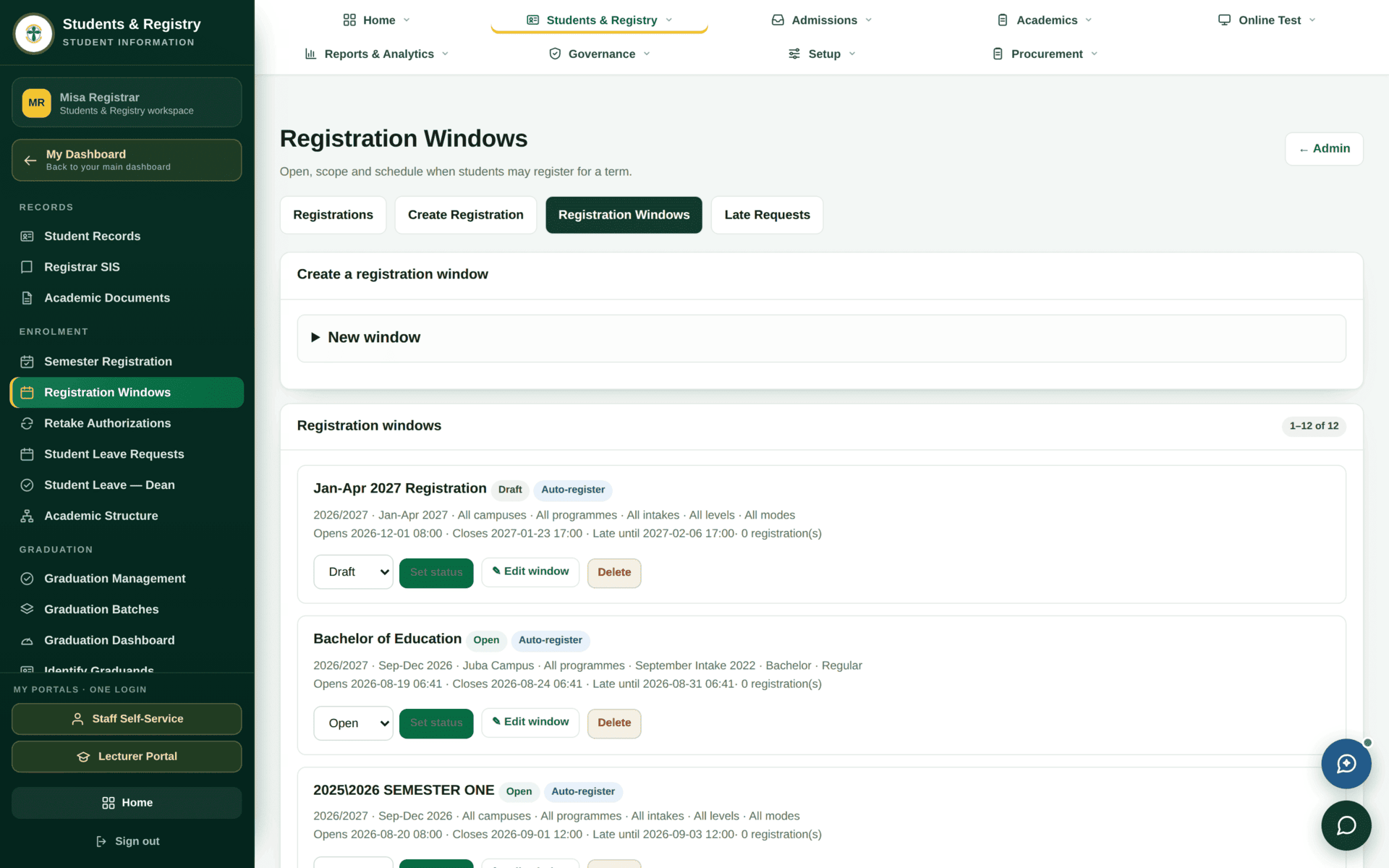
| Setting | What it does | Watch for |
|---|---|---|
| Scope | Academic year, term, campus, programme, intake, level and mode — any of which can be All | A window scoped to one programme will not let anyone else register. Two overlapping windows is the usual cause of "some students can, some can't" |
| Opens / Closes | The normal registration period | Times are exact, to the minute. A window closing at 17:00 refuses at 17:01 |
| Late until | A grace period after closing, during which registration becomes a request rather than an act | Late registrations land in Late Requests for a decision, and may attract a fee |
| Status | Draft or Open | A window with perfect dates does nothing while it is still Draft. Set the status with the dropdown, then Set status |
| Auto-register | Eligible students are registered without asking | Convenient, but it registers everyone the scope covers. Narrow the scope before you tick it |
A newly created window defaults to Draft. Students then report that registration “is not open” while the screen shows a window with correct dates. Look at the badge, not the dates.
The registration workspace
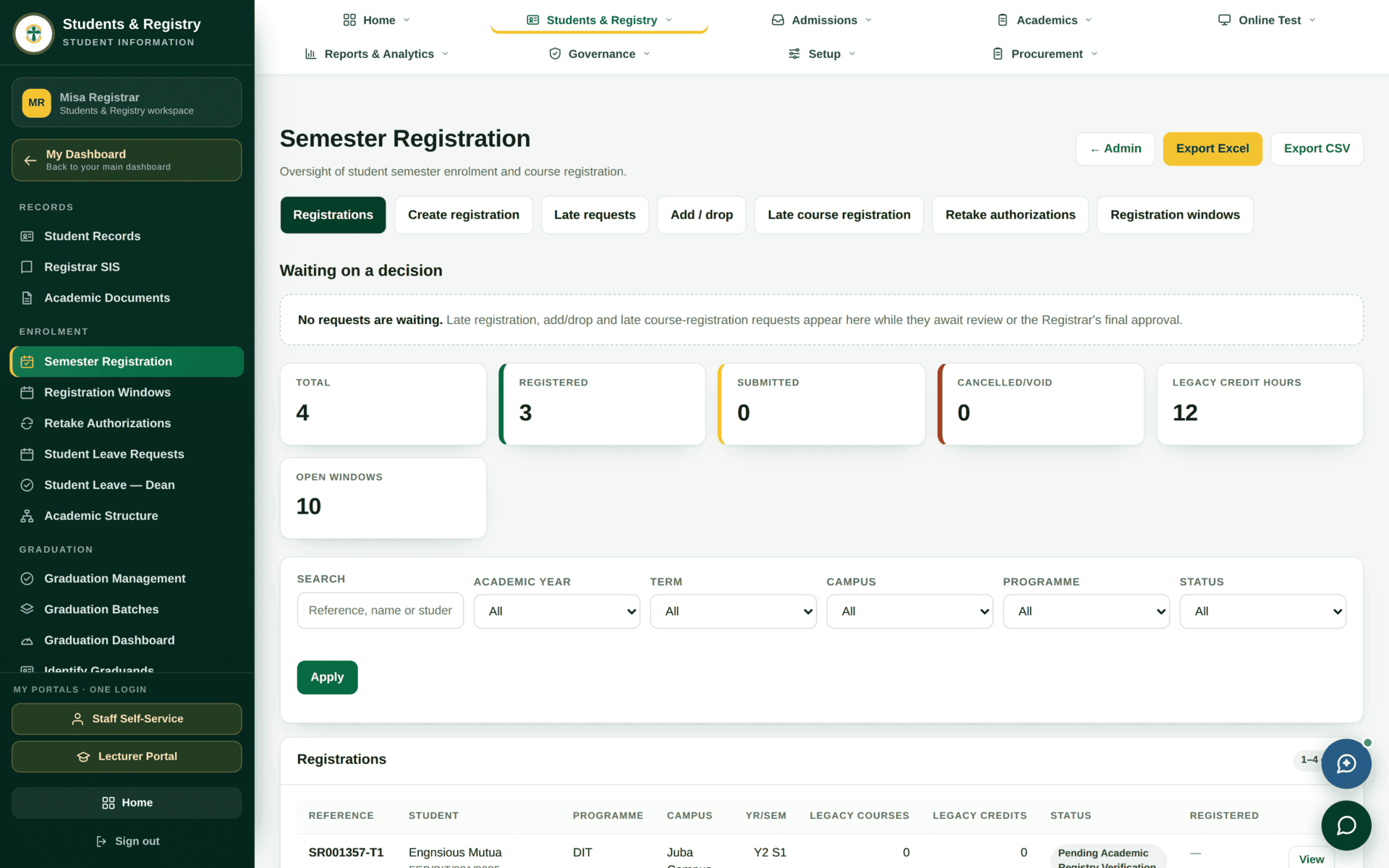
| Tab | Use it to |
|---|---|
| Registrations | Browse and filter what has been registered this term; export it |
| Create registration | Register one student by hand — for a case the window does not cover |
| Late requests | Decide registrations submitted inside the Late until grace period |
| Add / drop | Change a registered student's course list after registration |
| Late course registration | Add a course after the course-registration period has closed |
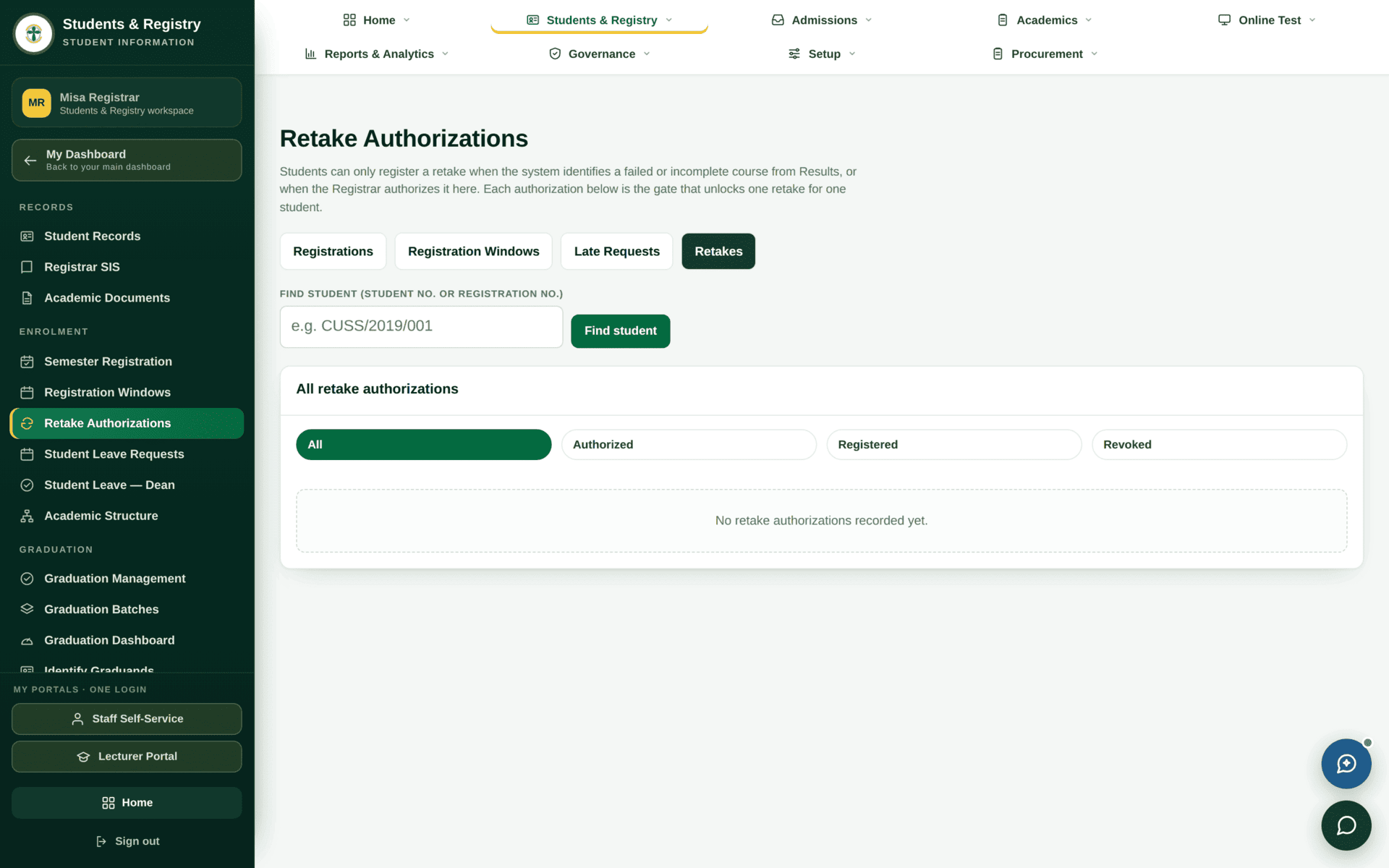
| Retake authorizations | Permit a student to retake a failed course — a separate permission, semester-registration.retake-authorize |
| Registration windows | The windows screen above |
Reading the tiles
- Total — registration records for the filtered term
- Registered — completed and verified
- Submitted — waiting on a check
- Cancelled / void — withdrawn registrations, kept for the record
- Legacy credit hours — credit carried in from before UniMIS
- Open windows — how many windows are currently letting students in
Pending Academic Registry Verification is the common one: the student has registered, and registry has not yet confirmed it. Until it is verified it is not a registration for the purposes of class lists and examination eligibility.
Worked example
Opening registration for September 2026, Juba Campus
| Open | Students & Registry›Registration Windows |
| Expand | New window |
| Name | 2026/2027 Semester One — Juba. Name it so a colleague can tell two windows apart at a glance |
| Scope | Year 2026/2027 · Term Sep-Dec 2026 · Campus Juba Campus · Programme All · Level All · Mode All |
| Opens | 2026-09-01 08:00 |
| Closes | 2026-09-19 17:00 |
| Late until | 2026-09-26 17:00 — a week of grace, decided case by case |
| Auto-register | Leave off for a first run. Watch one day of real registrations before automating |
| Save, then | Set the dropdown to Open and press Set status. It does nothing while it says Draft |
| Verify | Students & Registry›Semester Registration — Open windows should have gone up by one |
| Day one | Watch Submitted. If it stays at zero while students say they tried, the scope is too narrow — check campus and level first |
Late requests, add/drop and retakes
All three are the same shape: a student asks, an officer decides, the decision is recorded with a reason.
Retake authorisation
A retake is not automatic. It needs an authorisation on this screen before the student can register for the course again, and it may be billable — retake fees are configured in Student finance and are one of the charges that is switched on. Authorise the retake first, then let the student register; doing it the other way round produces a registration the fee rules do not recognise.
If registration refuses
| What the student reports | Cause | Where to look |
|---|---|---|
| “Registration is not open” | The window is still Draft, or today is outside its dates | Registration Windows — the badge and the times |
| Some students can register, others cannot | The window's scope excludes them — usually campus, level or mode | The scope line on the window |
| They can register but see no courses | No curriculum version for their entry year, or the curriculum is not activated | Curriculum & academic structure |
| Blocked with a finance message | Fee clearance rules require a payment or a threshold first | Student finance — clearance rules |
| Blocked and their standing is not Active | Deferred, suspended or withdrawn students cannot register | Student records |
| A failed course will not appear | No retake authorisation | The Retake authorizations tab |
| Registered, but missing from a class list | Still Pending Academic Registry Verification | The Registrations tab — verify it |